
In the rapidly evolving world of artificial intelligence, large language models (LLMs) have revolutionized how we interact with technology. However, these models often struggle with hallucinations—generating plausible but incorrect information—or outdated knowledge from their training data. Enter Retrieval-Augmented Generation (RAG), a powerful technique that bridges this gap by combining the strengths of information retrieval and generative AI. RAG enhances the accuracy, relevance, and reliability of AI outputs by dynamically fetching external data to inform responses. In this blog, we’ll dive into what RAG is, how it works, its benefits, implementation steps, real-world applications, and some challenges to consider.
What is Retrieval-Augmented Generation (RAG)?
At its core, RAG is an AI framework that augments generative models with external knowledge sources. Unlike traditional LLMs that rely solely on pre-trained parameters, RAG retrieves relevant information from a knowledge base—such as documents, databases, or web content—and incorporates it into the generation process. This hybrid approach merges natural language generation (NLG) with information retrieval (IR), allowing models to produce more contextually accurate responses. Think of RAG as a smart assistant that doesn’t just recall what it learned in “school” but actively looks up the latest facts before answering. For instance, if you ask about current events or domain-specific details, RAG ensures the response is grounded in real, up-to-date data rather than fabricated details.
Tech Stack
- Langchain
- Python
How Does RAG Work?
RAG operates through a multi-step process that can be broken down into retrieval, augmentation, and generation:
Query Processing: The user’s input is analyzed to form a search query. Retrieval: Using techniques like vector search or semantic similarity, relevant documents or snippets are fetched from an external knowledge base (e.g., via vector databases like Pinecone or FAISS). Augmentation: The retrieved information is injected into the prompt for the LLM, providing context. Generation: The LLM generates a response based on the augmented prompt, ensuring it’s informed and accurate.
This architecture often involves embedding models to convert text into vectors for efficient similarity searches, making RAG scalable for large datasets.
Benefits of Implementing RAG
RAG offers several advantages that make it a go-to solution for enhancing AI systems:
Improved Accuracy and Reduced Hallucinations: By grounding responses in external data, RAG minimizes errors and ensures factual outputs. Up-to-Date Information: Unlike static models, RAG can access real-time or frequently updated knowledge bases. Cost-Effectiveness: It avoids the need for constant retraining of LLMs, as new knowledge is added via the retrieval layer. Customization: Tailor the knowledge base to specific domains, like legal, medical, or enterprise data. Enhanced Relevance: Responses are more context-specific, leading to better user experiences in applications like chatbots or search engines.
Architecture of RAG
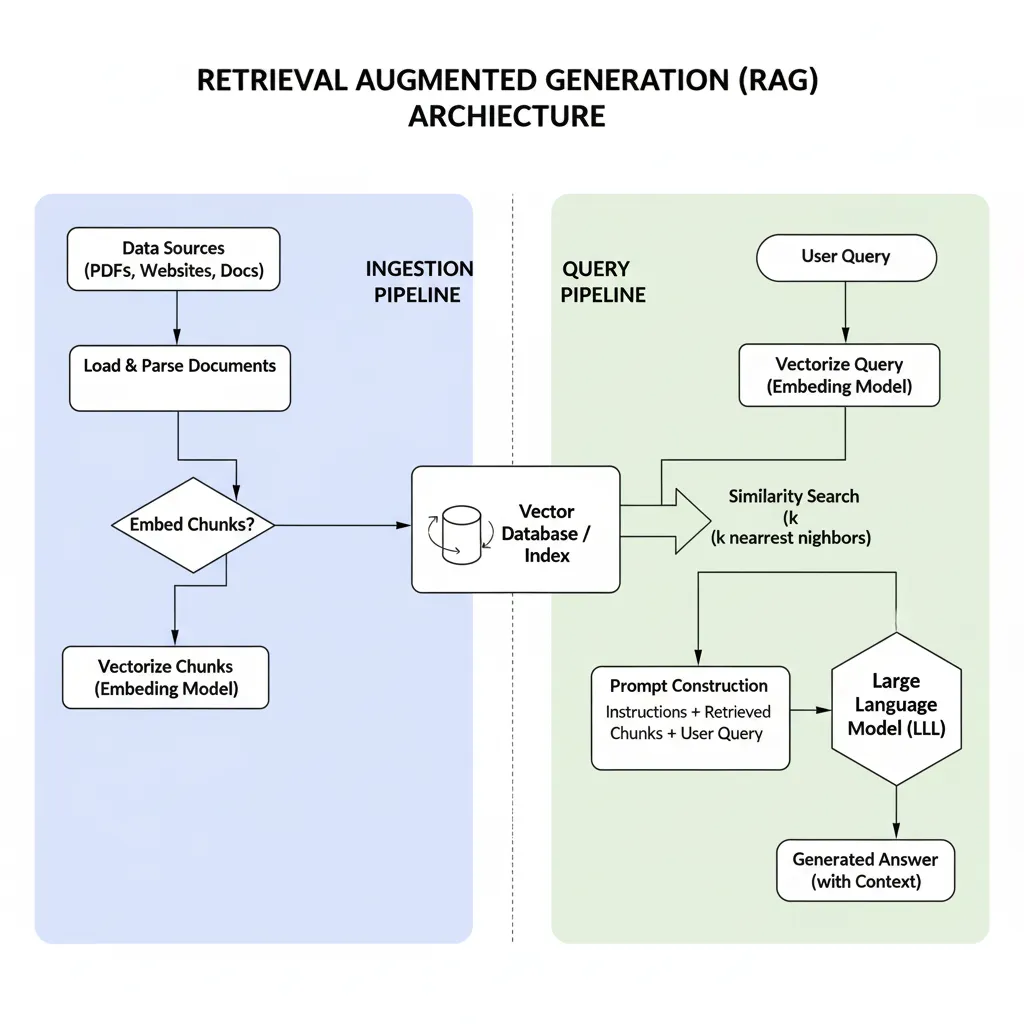
The Retrieval-Augmented Generation (RAG) architecture combines the strengths of information retrieval and natural language generation to produce more accurate and contextually relevant outputs. In this approach, a retriever component first queries a large knowledge base, such as a vectorized document store, to fetch relevant documents or passages based on the input query. These retrieved documents are then passed to a generative model, typically a transformer-based large language model, which synthesizes the information into a coherent and precise response. By grounding the generation process in retrieved external knowledge, RAG mitigates the limitations of purely generative models, such as hallucination or outdated information, making it highly effective for tasks requiring up-to-date or domain-specific knowledge.
Embeddings
Imagine trying to teach a computer what the word “apple” means. You could give it a dictionary definition, but that’s just more words! Instead, what if you could give “apple” a unique set of numbers that captures its meaning—like a secret code that says, “Hey, this is a fruit, it’s related to pears, and it’s not a car”? That’s exactly what embeddings do in the world of artificial intelligence (AI). Let’s break it down in a simple, science-y way!
Embeddings are like a superpower for computers. They take words, sentences, or even entire documents and turn them into lists of numbers (called vectors) that pack in their meaning. These numbers aren’t random—they’re carefully crafted by AI models (like BERT or sentence transformers) to place similar things close together in a kind of “meaning space.” For example, the embeddings for “dog” and “puppy” would be super close because they’re similar, but “dog” and “spaceship” would be far apart.
Here’s the cool science bit: these vectors are usually in a lower-dimensional space (think hundreds of numbers instead of thousands) compared to raw data, but they still capture the essence of the original text. This makes them perfect for tasks like searching for information. In something like the Retrieval-Augmented Generation (RAG) system, embeddings help the computer find documents that match your question by comparing their number codes. If your question is about “apples,” the system uses embeddings to grab texts about fruits, not iPhones!
Why is this awesome? Embeddings let AI understand context and meaning, making it smarter at answering questions or generating text. It’s like giving your computer a map of language where it can find its way to the right answers. So, next time you hear about embeddings, think of them as the secret sauce that helps AI make sense of our messy, beautiful human words!s
Vector Store
Imagine a massive library where every book, instead of being stored on shelves by title or author, is organized by its meaning in a way that makes it super easy for an AI to find exactly what it needs. That’s what a vector store does in the world of artificial intelligence, and it’s a key player in systems like Retrieval-Augmented Generation (RAG). Let’s dive into this in a beginner-friendly, science-y way! A vector store is like a digital warehouse that holds embeddings—those special number codes we talked about that capture the meaning of words, sentences, or documents. Each piece of text (say, a Wikipedia article or a blog post) is turned into a vector (a list of numbers) using an AI model like BERT. These vectors are then stored in the vector store, where they’re organized so that similar meanings are grouped close together in a kind of “meaning universe.” For example, vectors for “cat” and “kitten” would be neighbors, while “cat” and “rocket” would be far apart. Here’s where the science magic happens: when you ask an AI a question, the vector store acts like a super-smart librarian. It takes the embedding of your question (yup, your question gets turned into a vector too!) and quickly searches for the closest-matching vectors in the store. This is done using math tricks like cosine similarity, which measures how “close” two vectors are in terms of meaning. The vector store then hands over the most relevant documents to the AI, which uses them to craft a spot-on answer. Why is this so cool? Vector stores make it lightning-fast for AI to find the right information in a sea of data, without having to read every word. They’re like the backbone of systems like RAG, helping AI combine real-world knowledge with its language skills to give you accurate, context-rich answers. So, next time you hear about a vector store, picture a futuristic library where AI finds the perfect “book” of knowledge in a snap!2.6sFast
Chunking
Picture a giant pizza—too big to eat in one bite, right? So, you slice it into smaller, manageable pieces. In the world of AI, chunking is like slicing up a huge piece of text into bite-sized portions so the AI can process it better. Let’s explore this in a simple, beginner-friendly, yet science-y way, especially since it’s a key part of systems like Retrieval-Augmented Generation (RAG)! Chunking is the process of breaking down large documents, like articles or books, into smaller chunks—think paragraphs, sentences, or even a set number of words. Why? Because AI models, even super-smart ones, have limits on how much text they can handle at once, and long texts can be messy to search through. By splitting text into smaller pieces, each chunk gets turned into an embedding (those nifty number codes we talked about) and stored in a vector store. This makes it easier for the AI to find exactly the right piece of information when you ask a question. For example, if you’re asking about “pizza toppings,” the AI can grab just the chunk about pepperoni and mushrooms, not the whole recipe book! The science-y bit? Chunking strategies vary—some split by sentences, others by fixed word counts or even by meaning (like keeping a whole paragraph about one idea together). Smart chunking ensures each piece has enough context to be useful but is small enough to be efficient. In RAG, these chunks are what the retriever searches through to find relevant info, which the AI then uses to craft a clear, accurate answer. So, chunking is like giving AI a perfectly organized toolbox—making it faster and smarter at digging up the right knowledge for you!
Prompt
Imagine you’re asking a friend for help with a tricky question, but you need to phrase it just right to get the best answer. In the world of AI, a prompt is like that perfectly crafted question or instruction you give to an AI model to get it to respond in the way you want. Whether you’re using a system like Retrieval-Augmented Generation (RAG) or chatting with an AI like me, prompts are the key to unlocking smart, useful responses. Let’s break it down in a beginner-friendly, science-y way! A prompt is simply the text you feed into an AI to tell it what to do. It could be a question (“What’s the capital of France?”), a command (“Write a poem about stars”), or even a detailed instruction (“Summarize this article in three sentences”). The science behind it? AI models, like the ones powering RAG, are trained on massive amounts of text and rely on prompts to understand your intent. In RAG, prompts are extra important because they guide both the retriever (which searches for relevant info in a vector store) and the generator (which crafts the final answer). A good prompt is clear and specific, like telling a librarian exactly what book you need, while a vague prompt might lead to a less helpful response. Here’s the cool part: crafting a great prompt is like an art and a science! For example, adding details like “Explain in simple terms” or “Use examples” can make the AI’s answer more beginner-friendly. In RAG, a well-designed prompt helps the system fetch the right chunks of information and weave them into a clear, accurate response. So, next time you interact with an AI, think of your prompt as a magic spell—carefully worded to spark the AI’s brilliance and get you exactly the answer you’re looking for!